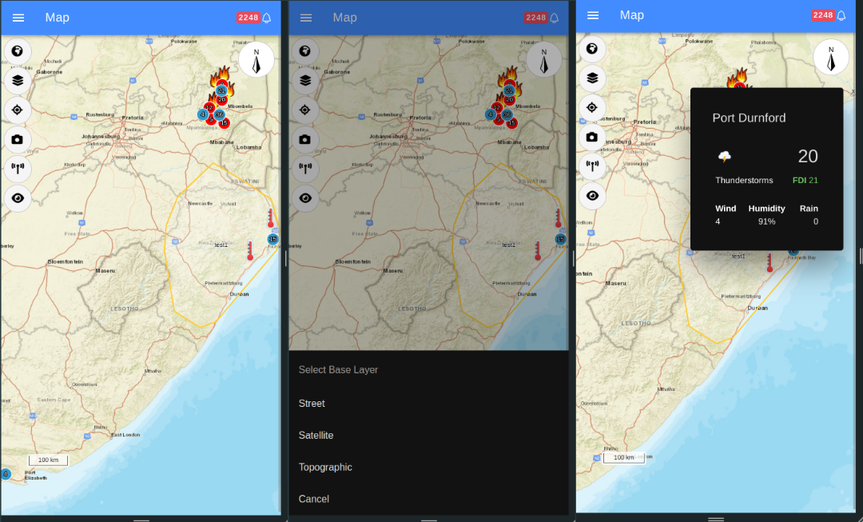
EnviroVision Map Integration with FireWeb
Kartoza was contracted by Spinning Your Web Pty Ltd (SYW) to further develop the mapping functionality for EVS ForestWatch Mobile Fire Alert & Monitoring Solution.
Spinning Your Web Pty Ltd
Started: 2024-06-21
Completed: 2024-09-30
Overview
The primary focus was on front-end work of the platform.
The functionality for the EVS Mobile Mapping feature, was divided into three main areas:
- Default Map: This involves displaying sites, weather stations, and alarms from tables on a map with unique icons. Alarms show on the mapping interface with a dotted line to the site that identified and reported the report with a click through link to the alarm interface. This task was primarily pulling the information out of the local database and presenting it correctly on the mapping interface.
- Map Interactions: This involves adding various interactive features to the map interface, accessible through a drop-down menu.
The interactions include:
- Center On: Centering the map on the user's location (or custom location override) or defined regions of interest.
- All Features: Displaying all sites, weather stations, and alarms on the map.
- What Can See: Showing the closest four sites to a selected custom point or the user's location, along with camera images and weather conditions.
- Cameras: Displaying a list of cameras from a database, centering the map on a selected camera, and providing access to camera images and information.
- Weather Stations: Displaying a list of weather stations from a database, centering the map on a selected station, and providing weather details.
- Base Layer Toggle: Allowing users to switch between hybrid, satellite, and street view base layers.
- Regions of Interest: This involves users drawing polygons on a map in the settings module. Currently, these regions are stored in a database. The remaining work to complete this functionality includes:
- Storage: This involves processing existing regions of interest in a database and transferring them to the FireWeb API, as well as retrieving them from the FireWeb API upon authentication.
- Auto Plot (with an option to increase size by a buffer). This includes:
- Auto plot by favorite group - Selecting all cameras within a favorite group and displaying a visible polygon. Users should be able to save, edit, and delete the region of interest from the auto-plot.
- Auto plot region - Selecting cameras within an instance or region and displaying a visible polygon. Users should be able to save, edit, and delete the region of interest from the auto-plot.
- The ability to edit and delete a region of interest.


Project Timeline
—
—
Start Date
2024-06-21
Completed
2024-09-30
Clients
.png)


