Kartoza - Building an Operational Geospatial Workflow
The following blog article covers the main parts expected in a scalable and resource-efficient workflow, which you can use as a template to get you started.
Developing a large-scale Earth Observation (EO) data pipeline, especially for the first time, includes the daunting task of transitioning from a localised EO workflow (often in the form of a Jupyter Notebook) to an operational workflow covering a much larger area of interest, like a country or continent. This article covers the main parts expected in a scalable and resource-efficient workflow that you can use as a template to get started.
A basic workflow consists of the following steps:
- Generate tasks
- Determine the tile size
- Determine the components of a task (tile + time unit)
- Generate a collection of all expected tasks to be processed
- Processing tasks
- Main function to process a single task
- Wrapper function that determines how the collection of tasks is to be processed
Generate tasks
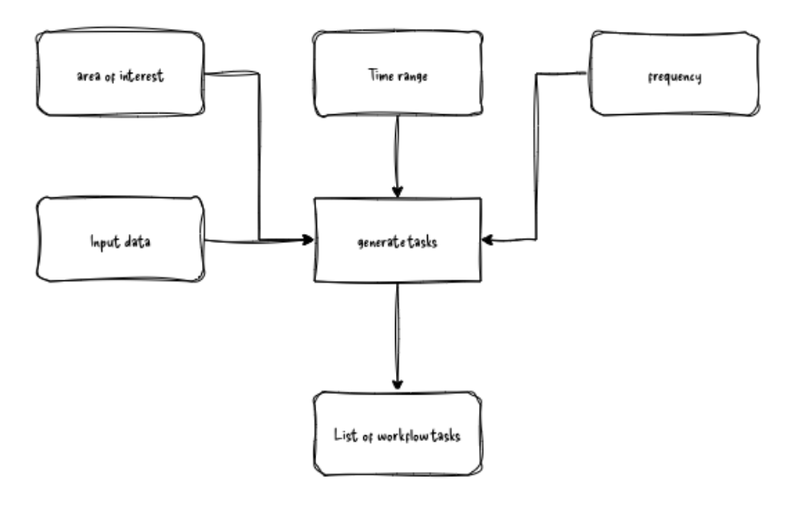
The goal of the generate tasks step is to create a list or other collection of all the expected units (tasks) to be processed in the workflow. This step should be reproducible such that when fed the same parameters, it always generates the same number of tasks in the same order.
Tiling
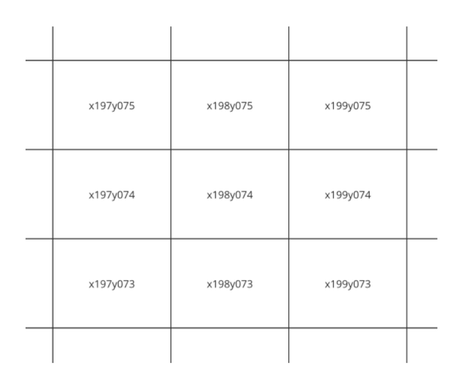
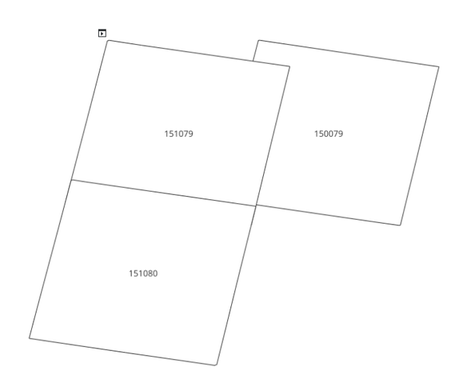
The first step in the workflow is tiling of the area of interest. This is essentially breaking up the area of interest into manageable chunks. The resultant tiles can be overlapping tiles or adjacent tiles.
 |  |
| Adjacent Tiles | Overlapping Tiles |
Tiles are defined within a grid index system. There are a number of existing grid systems one can choose from. The only mandatory requirement when selecting a grid system or defining your own is that each tile must have a unique identifier in the grid system.
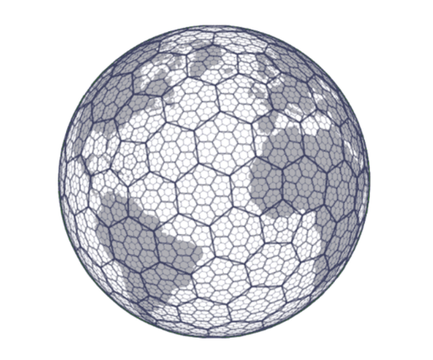 | 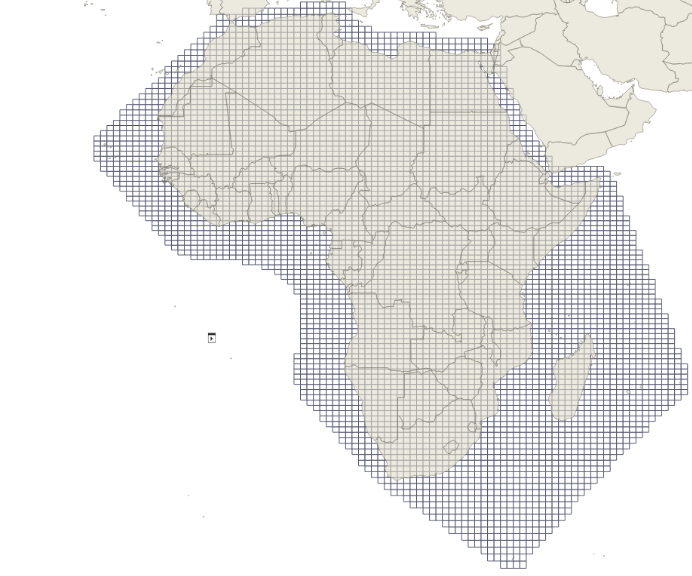 |
| H3: Uber’s hexagonal hierarchical spatial index | “africa-10” grid system from odc-dscache used in Digital Earth Africa’s Water Quality Annual Variables product |
Tasks
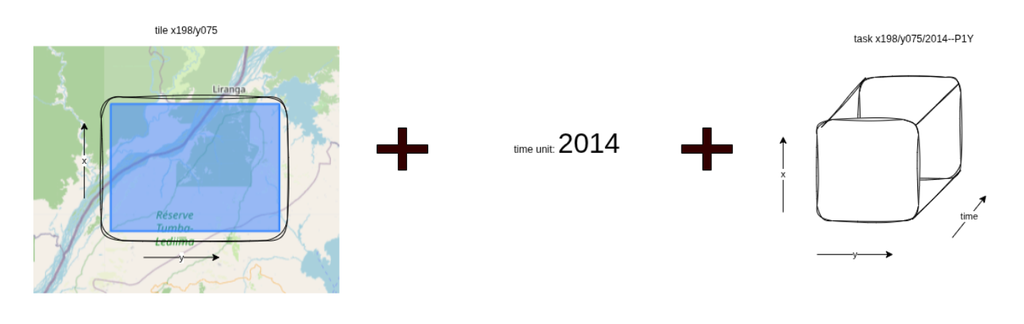
Once the tile is defined the processing unit, i.e., the task, must be determined. A task can be conceptualised as a three-dimensional unit. The tile defines the x and y extent, while a single time step defines the third dimension. This temporal unit is flexible, representing a weekly, monthly or annual duration or time step depending on the required product specification.
For example, Digital Earth Africa Water Quality Monitoring Service contains the Water Quality Annual Variables product where the time step is yearly, covering 2000 to 2025. An example of a task is “x198/y075/2014–P1Y”.
Good practice is also to pass the required inputs for a task as part of the list or collection of tasks. These allow for the ease of having all the information required to process a single task available in the same place:
task = {task_id: "x198/y075/2014-P1Y",time_unit: "2014-P1Y",tile_extent: <polygon geometry>,task_inputs: { "water_mask": :"/path/to/water mask","ndvi_band": "/path/to/nvi_band"}}
Process tasks
This stage executes the generation of outputs based on input datasets, scaling the logic designed in the initial prototype from a small area of interest (AOI) to the full production scale. The workflow consists of a main function designed to process a single task and an orchestration container (or wrapper function). This container manages task execution either by iterating through a task list sequentially or by employing parallel processing on a single node.
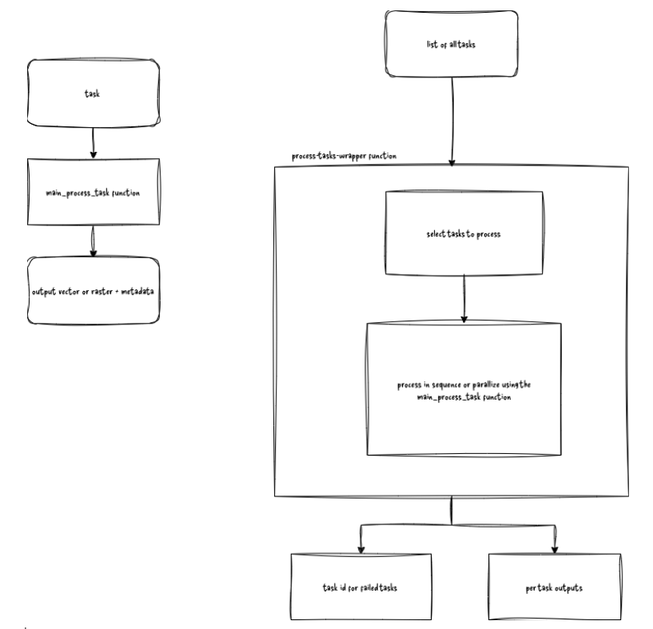
The reason for having the main process tasks function focusing on one task at a time is the flexibility to adapt the wrapper function based on the resources available. You can have separate nodes on a distributed system and select tasks from the collection and process them sequentially at the same time, or you can have a single node and design the wrapper function for parallel processing.
The hallmarks of a well-designed process task step are:
- Well labelled outputs
- Proper logging
- Efficient resource allocation and use
The outputs for a single task should be well labelled using a consistent naming convention. An example of a naming convention is:
<product_name?>/<product-version>/x_tile_id/<y_tile_id>/<period_id>/<product_name?><product-version>_<x_tile_id>_<y_tile_id>_<period_id>.file_extension.
This was used to produce https://deafrica-water-quality.s3.af-south-1.amazonaws.com/mapping/wq_annual/1-0-0/x240/y053/2022--P1Y/wq_annual_x240y053_2022--P1Y.stac-item.json Which is the STAC file output for the task x240/y053/2022--P1Y for the DE Africa Water Quality Annual Variables product. Proper error messages and logging in general should be clear and concise, with failed tasks documented in a collection or output file for future reference or to rerun. Additionally, make use of parallel computing libraries like dask to be able to process larger-than-memory datasets efficiently.
Selecting test areas
After designing your workflow, it’s time to test it. It’s a universal experience in development that when testing a workflow, everything works fine for a test area, but during production a lot of edge cases trip up the workflow and you have to go back to development to fix the workflow for one edge case, then another and another. To reduce the number of times this happens for remote sensing workflows, select test tiles with the following characteristics:
- Open water pixels only
- Land pixels only
- Both land and water pixels present e.g area contains a waterbody
These three criteria can serve as a starting point for selecting test areas and you can expand the criteria as you go along, depending on your workflow. If you are working on a crop monitoring workflow, then additional test tile criteria should be a tile with bare soil, crop and water pixels and tiles where only a mix of pairs or individual types are included.
Conclusion
We’ve covered the steps required in a large-scale EO workflow: the generate tasks step, the process tasks step and testing your workflow. This template can be applied to a variety of projects, including data pre-processing into ARD (analysis ready data) and machine learning workflows. At this point, you should have the first draft of your scalable workflow ready for your first big run in development.
Best of luck, and remember development is an iterative process; if it does not work the first time, go back to the drawing board and try again.
Note: The examples here are drawn from the DE Africa Water Quality Monitoring Service codebase of whose product development team I was a part.



No comments yet. Login to start a new discussion Start a new discussion